

Introduction
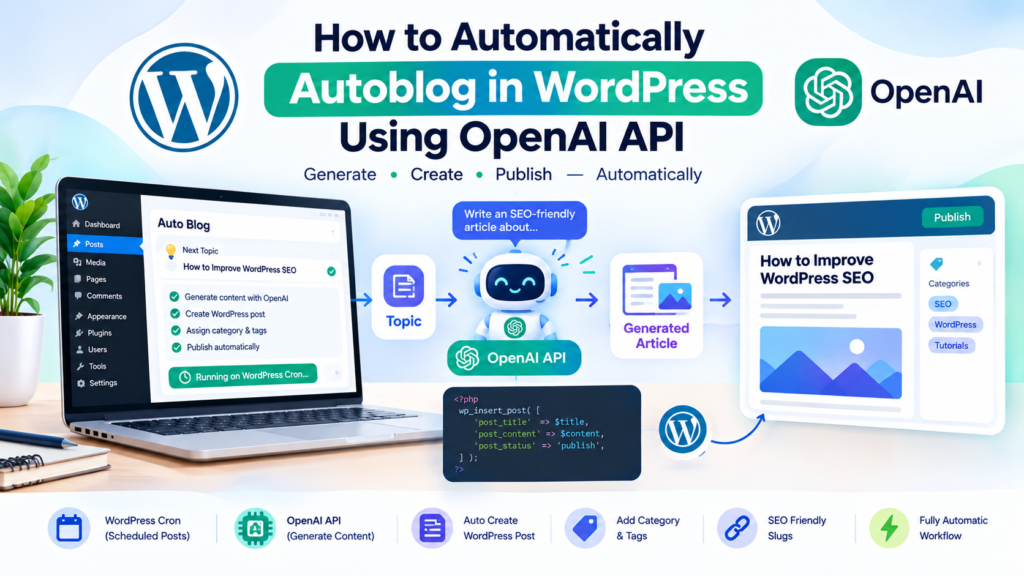
Running a WordPress blog consistently can be difficult when you have to research topics, write articles, format content, and publish new posts every day. One way to automate part of this workflow is to connect WordPress with the OpenAI API.
With the right custom code, you can build an automated publishing workflow that selects a topic, sends instructions to OpenAI, receives an article, and creates a WordPress post automatically.
In this guide, you will learn how to autoblog in WordPress using OpenAI API with a lightweight custom plugin and WordPress Cron.
The setup can be configured to:
- Select topics automatically
- Send article instructions to OpenAI
- Generate an article
- Create a WordPress post
- Assign a category
- Add tags
- Generate a slug
- Publish immediately or save as a draft
- Run automatically on a schedule
- Prevent duplicate Cron events
- Keep your OpenAI API key outside the plugin code
The OpenAI Responses API is currently the recommended API interface for generating model responses, and OpenAI’s current model catalog includes models with different capabilities and pricing, so the model ID should be treated as a configurable setting rather than something permanently hard-coded.
What Is WordPress Autoblogging?
WordPress autoblogging means creating a workflow where some or most of the publishing process happens automatically.
A simple AI autoblog system can work like this:
Topic → OpenAI API → Generated Article → WordPress → Draft/Publish
For example, your topic list might contain:
- How to speed up WordPress
- How to fix WordPress database errors
- Best WordPress security practices
- How to configure WordPress caching
- WordPress SEO tips
- How to troubleshoot plugin conflicts
The automation selects one topic and sends a carefully written prompt to OpenAI.
OpenAI generates the article, and WordPress uses wp_insert_post() to create the post. WordPress officially provides wp_insert_post() for inserting or updating posts programmatically.
How the Complete System Works
Before writing the code, it is useful to understand the workflow.
WordPress Cron
      ↓
Select Next Topic
      ↓
Build AI Prompt
      ↓
OpenAI Responses API
      ↓
Receive Generated Content
      ↓
Extract Title + Article
      ↓
Create WordPress Post
      ↓
Add Category + Tags
      ↓
Draft or Publish
The automation has four main components:
- OpenAI API
- Custom WordPress plugin
- WordPress Cron
- WordPress post creation functions
WordPress Cron supports recurring scheduled events such as hourly, twice-daily, daily, and weekly tasks. It also provides wp_next_scheduled() to prevent accidentally creating duplicate scheduled events.
Step 1: Create an OpenAI API Key
You first need an API key from your OpenAI API account.
Create and manage your API keys from the OpenAI API key area. OpenAI specifically recommends keeping API keys private and storing them securely rather than exposing them in application code.
Do not put the API key directly inside your public WordPress plugin file.
Instead, we will place it inside wp-config.php.
Step 2: Store the API Key in wp-config.php
Open your WordPress wp-config.php file.
Add this before the line that says:
/* That's all, stop editing! Happy publishing. */Add:
define( 'OPENAI_API_KEY', 'YOUR_OPENAI_API_KEY_HERE' );Replace:
YOUR_OPENAI_API_KEY_HEREwith your actual API key.
Your configuration will look similar to:
define( 'OPENAI_API_KEY', 'sk-your-api-key-here' );Keeping the secret outside the main plugin file makes it less likely that you accidentally publish the key when sharing or updating your plugin.
OpenAI also recommends secure key storage, access controls, monitoring, and key rotation.
Step 3: Choose an OpenAI Model
OpenAI currently provides several models through the API, including models designed for different combinations of intelligence, speed, and cost. The current model catalog should be checked when configuring a production autoblog because model availability and pricing can change.
For a high-volume autoblog, you may want to use a cost-efficient model.
For higher-quality long-form content, you may choose a more capable model.
For this example, we will make the model configurable:
'model' => 'gpt-5.6-luna',You can replace that value with another model ID available to your API project.
Step 4: Create the Custom Autoblog Plugin
Now create a new folder:
/wp-content/plugins/openai-autoblog/Inside that folder, create:
openai-autoblog.phpAdd the following code:
<?php
/**
 * Plugin Name: OpenAI WordPress Autoblog
 * Description: Automatically generates WordPress articles using the OpenAI Responses API.
 * Version: 1.0.0
 * Author: Your Name
 */

if ( ! defined( 'ABSPATH' ) ) {
	exit;
}

/*
 * Configuration
 */
define( 'OAI_AUTOBLOG_MODEL', 'gpt-5.6-luna' );
define( 'OAI_AUTOBLOG_CATEGORY', 'Custom Code' );

/*
 * Topics used by the autoblogger.
 */
function oai_autoblog_topics() {

	return array(
		'How to Speed Up a WordPress Website',
		'How to Fix Common WordPress Plugin Conflicts',
		'How to Improve WordPress Website Security',
		'How to Optimize WordPress Database Performance',
		'How to Configure WordPress Caching Correctly',
		'How to Fix Common WordPress Errors',
		'How to Improve WordPress SEO',
		'How to Reduce WordPress Page Load Time',
	);
}

/*
 * Schedule the autoblog event.
 */
function oai_autoblog_activate() {

	if ( ! wp_next_scheduled( 'oai_autoblog_generate_post' ) ) {
		wp_schedule_event(
			time() + 300,
			'daily',
			'oai_autoblog_generate_post'
		);
	}
}

register_activation_hook( __FILE__, 'oai_autoblog_activate' );

/*
 * Remove scheduled event when plugin is deactivated.
 */
function oai_autoblog_deactivate() {

	wp_clear_scheduled_hook( 'oai_autoblog_generate_post' );
}

register_deactivation_hook( __FILE__, 'oai_autoblog_deactivate' );

/*
 * Connect Cron event with the generator.
 */
add_action(
	'oai_autoblog_generate_post',
	'oai_autoblog_create_post'
);

/*
 * Get the next topic.
 */
function oai_autoblog_get_topic() {

	$topics = oai_autoblog_topics();

	$current_index = (int) get_option(
		'oai_autoblog_topic_index',
		0
	);

	$topic = $topics[ $current_index % count( $topics ) ];

	update_option(
		'oai_autoblog_topic_index',
		$current_index + 1
	);

	return $topic;
}

/*
 * Generate the article with OpenAI.
 */
function oai_autoblog_generate_article( $topic ) {

	if ( ! defined( 'OPENAI_API_KEY' ) || ! OPENAI_API_KEY ) {
		return new WP_Error(
			'missing_api_key',
			'OpenAI API key is not configured.'
		);
	}

	$instructions = '
You are an expert WordPress technical writer.

Write a useful, original, detailed article for a WordPress website.

The article must:
- Be written in natural English.
- Be approximately 1500 to 2000 words.
- Use clear headings.
- Use short paragraphs.
- Include practical instructions.
- Include code examples when useful.
- Avoid keyword stuffing.
- Avoid fake statistics.
- Do not invent sources or product claims.
- Do not mention that the article was written by AI.
- Do not include a generic introduction that adds no value.
- Include an FAQ section.
- Finish with a useful conclusion.

Return the response in exactly this format:

TITLE: Article title

CONTENT:
Article content in HTML.
';

	$prompt = $instructions . "\n\nTopic:\n" . $topic;

	$body = array(
		'model' => OAI_AUTOBLOG_MODEL,
		'instructions' => $instructions,
		'input' => $prompt,
		'store' => false,
	);

	$response = wp_remote_post(
		'https://api.openai.com/v1/responses',
		array(
			'timeout' => 120,
			'headers' => array(
				'Authorization' => 'Bearer ' . OPENAI_API_KEY,
				'Content-Type'  => 'application/json',
			),
			'body' => wp_json_encode( $body ),
		)
	);

	if ( is_wp_error( $response ) ) {
		return $response;
	}

	$status_code = wp_remote_retrieve_response_code( $response );
	$response_body = wp_remote_retrieve_body( $response );

	if ( $status_code < 200 || $status_code >= 300 ) {

		return new WP_Error(
			'openai_api_error',
			$response_body
		);
	}

	$data = json_decode(
		$response_body,
		true
	);

	if ( empty( $data['output_text'] ) ) {

		return new WP_Error(
			'empty_openai_response',
			'OpenAI returned no article content.'
		);
	}

	return $data['output_text'];
}

/*
 * Create the WordPress post.
 */
function oai_autoblog_create_post() {

	$topic = oai_autoblog_get_topic();

	$generated = oai_autoblog_generate_article(
		$topic
	);

	if ( is_wp_error( $generated ) ) {

		error_log(
			'OpenAI Autoblog Error: ' .
			$generated->get_error_message()
		);

		return;
	}

	$title = $topic;
	$content = $generated;

	/*
	 * Extract title if the model returned one.
	 */
	if (
		preg_match(
			'/TITLE:\s*(.+?)\s*CONTENT:/is',
			$generated,
			$matches
		)
	) {

		$title = trim( $matches[1] );

		$content = preg_replace(
			'/^.*?CONTENT:\s*/is',
			'',
			$generated
		);
	}

	/*
	 * Find the category.
	 */
	$category = get_category_by_slug(
		sanitize_title( OAI_AUTOBLOG_CATEGORY )
	);

	$category_id = $category
		? $category->term_id
		: 0;

	/*
	 * Create the post.
	 *
	 * Use draft while testing.
	 */
	$post_id = wp_insert_post(
		array(
			'post_title'   => wp_strip_all_tags( $title ),
			'post_content' => wp_kses_post( $content ),
			'post_status'  => 'draft',
			'post_type'    => 'post',
			'post_category' => $category_id
				? array( $category_id )
				: array(),
		),
		true
	);

	if ( is_wp_error( $post_id ) ) {

		error_log(
			'OpenAI Autoblog Post Error: ' .
			$post_id->get_error_message()
		);

		return;
	}

	update_post_meta(
		$post_id,
		'_oai_autoblog_generated',
		'1'
	);

	update_post_meta(
		$post_id,
		'_oai_autoblog_topic',
		$topic
	);
}
The code uses WordPress’s built-in HTTP API to send the request to OpenAI. wp_remote_post() is the WordPress function designed for POST requests, while wp_insert_post() creates the resulting WordPress post.
OpenAI’s current Responses API accepts an input, instructions, model ID, and other response settings, and the response object can expose generated text through output_text.
Step 5: Activate the Plugin
Go to:
WordPress Dashboard → Plugins
Find:
OpenAI WordPress Autoblog
Click Activate.
When the plugin is activated, WordPress schedules the daily Cron event.
The code also checks wp_next_scheduled() before creating the event so repeated activation does not continually create duplicate scheduled jobs.
Step 6: Test With Drafts First
Notice that the example uses:
'post_status' => 'draft',This is intentional.
Do not immediately allow AI-generated content to publish automatically on a production website.
The first few generated posts should be reviewed for:
- Accuracy
- Formatting
- Repetition
- Unsupported claims
- SEO quality
- Internal links
- Broken HTML
- Keyword usage
- Brand voice
- Factual accuracy
Once the workflow is reliable, you can change:
'post_status' => 'draft',to:
'post_status' => 'publish',That will allow the Cron job to publish generated articles automatically.
For most websites, keeping the first stage as draft → review → publish is a safer editorial workflow.
Step 7: Understand WordPress Cron
The automation depends on WordPress Cron.
WordPress Cron is different from a traditional server-side cron job. A scheduled WordPress event can execute when WordPress receives a request after the scheduled time has passed.
This means a website with very little traffic may not execute scheduled jobs exactly at the requested minute.
For a busy website, this may be sufficient.
For a low-traffic website, you can configure a real server cron job to trigger WordPress Cron.
This becomes particularly useful when you want an autoblog to run at a predictable time every day.
Step 8: Customize the Publishing Frequency
The example uses:
'daily'WordPress supports several built-in recurring intervals, including hourly, twice-daily, daily, and weekly.
For example:
wp_schedule_event(
	time() + 300,
	'daily',
	'oai_autoblog_generate_post'
);
For a new website, generating one article per day is generally easier to monitor than generating many articles simultaneously.
You can also create custom intervals with WordPress’s cron_schedules filter if your workflow requires a different schedule.
Step 9: Add More Topics
The topics are controlled by this function:
function oai_autoblog_topics() {

	return array(
		'How to Speed Up a WordPress Website',
		'How to Fix Common WordPress Plugin Conflicts',
		'How to Improve WordPress Website Security',
	);
}
You can replace these with topics from your own niche.
For example, if your website focuses on WordPress:
'How to Fix WordPress White Screen of Death',
'How to Reduce WordPress Database Size',
'How to Optimize WooCommerce Product Pages',
'How to Fix WordPress Login Problems',
'How to Configure WordPress XML Sitemaps',
'How to Improve Core Web Vitals in WordPress',
The plugin keeps an index so the next scheduled execution selects the next topic.
Step 10: Make the AI Prompt Better
The quality of your autoblog depends heavily on the prompt.
Instead of simply asking:
Write an article about WordPress caching.
Give the model detailed instructions.
For example:
Write a comprehensive WordPress tutorial.

Topic:
How to Fix WordPress Cache Issues

Requirements:

- Write 1800 words.
- Explain the problem for beginners.
- Explain common causes.
- Provide step-by-step solutions.
- Include relevant WordPress examples.
- Include troubleshooting steps.
- Use descriptive headings.
- Avoid repetitive wording.
- Avoid keyword stuffing.
- Do not invent statistics.
- Include an FAQ section.
- Use clean HTML.
- Make the article genuinely useful rather than generic.
A more detailed prompt gives the model a clearer target.
Adding SEO Instructions
You can also ask the API to produce SEO-friendly content.
For example:
SEO requirements:

- Use the primary keyword naturally.
- Mention the primary keyword in the introduction.
- Use related terms naturally.
- Create a descriptive title.
- Create useful subheadings.
- Write a compelling introduction.
- Include an FAQ section.
- Avoid unnatural repetition.
- Keep paragraphs readable.
Do not instruct the model to repeat the focus keyword dozens of times.
That can produce unnatural writing and may create exactly the kind of keyword-density problem you want to avoid.
A better approach is to focus on topic coverage and semantic relevance.
Adding Internal Links Automatically
One of the biggest weaknesses of a basic autoblog script is that generated posts may have no internal links.
You can improve this by giving the model a list of your existing articles.
For example:
Available internal articles:

1. How to Optimize WordPress Images for Faster Loading Speed
2. Best Free WordPress Cache Plugins for Mobile Performance
3. How to Setup Rank Math SEO Plugin Correctly for Higher Rankings
4. How to Integrate ChatGPT API into WordPress Website for Free
5. How to Backup Your WordPress Site Automatically for Free
6. How to Fix Post Not Indexing Error in Google Search Console
Adding External Sources
For factual articles, it is better to use authoritative sources instead of asking AI to invent references.
For this workflow, useful official resources include:
- OpenAI Responses API documentation
- OpenAI Models documentation
- WordPress wp_remote_post documentation
- WordPress wp_insert_post documentation
- WordPress wp_schedule_event documentation
If your autoblog covers current events, products, software versions, prices, or rapidly changing information, the automation should include a research/verification step rather than assuming the model’s generated text is automatically current.
How to Prevent Duplicate Articles
Topic rotation alone does not guarantee uniqueness.
A better system can check existing WordPress posts before generating a new article.
For example, you can search posts using:
$existing_posts = get_posts(
	array(
		'post_type'      => 'post',
		'post_status'    => 'any',
		'posts_per_page' => 1,
		'title'          => $topic,
	)
);
You can then skip the topic if an article with the same subject already exists.
For larger autoblogging systems, it is even better to maintain a database of:
- Topic
- Generated title
- Post ID
- Date generated
- Status
- API response ID
- Category
This makes the automation easier to monitor.
How to Prevent Low-Quality AI Content
Automatic publishing should not mean automatic acceptance.
Before publishing, check:
Accuracy
AI can produce plausible-sounding information that is incorrect or outdated.
Verify technical instructions, WordPress functions, plugin features, prices, statistics, and API details.
Originality
Do not simply ask AI to rewrite another website’s article.
Create original outlines and provide useful explanations, examples, and troubleshooting steps.
Readability
Use:
- Short paragraphs
- Descriptive headings
- Bullet lists
- Tables where appropriate
- Code blocks
- Practical examples
Search Intent
An article should answer the question implied by the title.
If the title says:
How to Fix WordPress Cache Issues
the article should actually provide troubleshooting steps rather than several paragraphs explaining what caching means.
How to Keep the OpenAI API Cost Under Control
Every generated article consumes API usage.
Your total cost depends on factors such as:
- Model
- Input tokens
- Output tokens
- Number of articles
- Prompt length
- Other API features
OpenAI publishes current model pricing and capabilities in its model documentation.
For an autoblog, avoid unnecessarily huge prompts.
For example, don’t send your entire website’s content to the API for every article unless your workflow actually requires it.
Instead, send:
- Topic
- Writing instructions
- Relevant internal links
- Important site rules
- Necessary reference material
This keeps the request more efficient.
Should You Automatically Publish Every Article?
There are two approaches.
Automatic Draft Workflow
Topic
↓
OpenAI
↓
Article
↓
WordPress Draft
↓
Human Review
↓
Publish
This provides more control.
Fully Automatic Workflow
Topic
↓
OpenAI
↓
Article
↓
WordPress
↓
Publish
This requires much more confidence in your prompt, topic selection, fact-checking, formatting, and quality-control system.
For a new autoblog setup, the draft workflow is easier to troubleshoot.
Add a Human Review Stage
Even if your goal is complete automation, a review stage can improve quality considerably.
Before publishing, check:
- Is the title accurate?
- Does the introduction match the search intent?
- Are the instructions correct?
- Are code examples valid?
- Are internal links relevant?
- Are external references legitimate?
- Is the focus keyword used naturally?
- Are headings properly structured?
- Are there unnecessary paragraphs?
- Does the article provide something useful?
This also gives you an opportunity to add screenshots, diagrams, examples, and personal experience that AI cannot automatically know about your website.
WordPress Autoblogging and SEO
Using OpenAI does not automatically make an article SEO-friendly.
Your SEO workflow should still include:
- Search intent
- Keyword research
- Helpful content
- Good titles
- Internal linking
- Descriptive URLs
- Image optimization
- Structured headings
- Meta descriptions
- Schema where appropriate
- Page speed
- Mobile usability
For your existing SEO workflow, you can connect the autoblog system with your existing Rank Math setup.
You can also review:
How to Setup Rank Math SEO Plugin Correctly for Higher Rankings
and
How to Optimize WordPress Images for Faster Loading Speed
as related internal resources.
Add Featured Images Automatically
The basic code above creates the article but does not generate a featured image.
You can extend the workflow later so that:
Topic
↓
Generate Article
↓
Generate Image Prompt
↓
Create Image
↓
Upload Image to Media Library
↓
Set Featured Image
↓
Publish Post
This requires another image-generation API request and WordPress media handling.
It is better to implement that as a separate stage instead of putting everything into one large function.
Common Problems With WordPress Autoblogging
Cron Is Not Running
If posts are not appearing, check whether the scheduled event exists.
WordPress provides functions such as wp_next_scheduled() for checking scheduled events.
Low-traffic websites may also experience delayed WP-Cron execution.
OpenAI API Error
Check:
- API key
- Model ID
- API account access
- Billing
- Rate limits
- Request timeout
- API response
Do not expose the complete API response or API key publicly when debugging.
Empty Article
The model may return an incomplete response or the response format may differ from what your parser expects.
The code checks for output_text and stops instead of creating an empty article.
Duplicate Cron Events
Always use:
wp_next_scheduled()before creating recurring events.
WordPress specifically recommends checking for an existing scheduled event to avoid duplicate scheduling.
Plugin Deactivation Does Not Stop the Schedule
The example includes:
wp_clear_scheduled_hook(
	'oai_autoblog_generate_post'
);
This removes the scheduled event when the plugin is deactivated. WordPress documents wp_clear_scheduled_hook() specifically for unscheduling events attached to a hook.
Security Tips for an OpenAI WordPress Autoblog
Never place an API key in JavaScript that runs in the visitor’s browser.
Do not put it inside:
header.php
footer.php
or publicly accessible JavaScript files.
Do not publish the key on GitHub.
Do not send the key through a frontend AJAX request.
Keep the key server-side.
OpenAI recommends secure API-key storage, key rotation, access controls, and monitoring because a leaked key can be abused and generate unauthorized API usage.
A Better Architecture for a Production Autoblog
If you eventually want a more advanced system, build it in stages:
Topic Database
      ↓
Duplicate Check
      ↓
Research
      ↓
AI Outline
      ↓
AI Article
      ↓
Fact Check
      ↓
SEO Processing
      ↓
Internal Linking
      ↓
Featured Image
      ↓
WordPress Draft
      ↓
Review
      ↓
Publish
This is considerably more reliable than a single Cron function that blindly generates and publishes content.
You can also add logging for:
- API errors
- Failed posts
- Generated post IDs
- Topic history
- API usage
- Generation timestamps
That makes debugging much easier as your website grows.
Frequently Asked Questions
Can I automatically publish AI articles in WordPress?
Yes. WordPress can create posts programmatically with wp_insert_post(), while WordPress Cron can trigger the generation process on a schedule.
Do I need a WordPress plugin for this?
You can build the workflow as a small custom plugin, which is what this tutorial demonstrates. A custom plugin keeps the automation separate from your theme.
Can I use the OpenAI Responses API with WordPress?
Yes. WordPress can send an HTTP POST request to the OpenAI API using its HTTP API, including wp_remote_post(). The current Responses API provides the /responses endpoint for generating model responses.
Can I automatically generate one article every day?
Yes. WordPress supports a daily recurring Cron schedule, and the example plugin uses that schedule.
Is fully automatic publishing safe?
It can be technically automated, but automatic generation does not guarantee factual accuracy or editorial quality. A draft-and-review workflow provides an additional quality-control step.
Can I automatically add internal links?
Yes. You can provide your existing article titles and URLs to the model or implement a WordPress-based internal-linking function that searches relevant posts.
Can the system generate featured images too?
Yes. Image generation can be added as another API step before the WordPress post is published.
Can I change the AI model later?
Yes. The model is configurable in the example:
define( 'OAI_AUTOBLOG_MODEL', 'gpt-5.6-luna' );OpenAI’s model catalog changes over time, so check the current API model documentation before changing it.
Final Thoughts
Building an autoblog in WordPress using OpenAI API is possible without installing a large collection of automation plugins.
A custom WordPress plugin can connect the major pieces:
WordPress Cron + OpenAI Responses API + WordPress Post API
The basic workflow is relatively simple: select a topic, send structured instructions to OpenAI, receive the generated content, and use wp_insert_post() to create the WordPress article.
However, the best long-term setup is not simply “generate and publish.” A stronger system adds duplicate detection, internal linking, SEO processing, fact checking, image generation, logging, and a review stage.
Start with AI-generated drafts. Once the workflow consistently produces content that meets your quality standards, you can decide whether some or all of the publishing process should be automated.

