

Introduction
Creating high-quality content consistently is one of the biggest challenges for WordPress website owners. Researching topics, creating outlines, writing articles, optimizing headings, and preparing content for publication can take hours for every post.
AI tools can reduce much of this manual work. Instead of switching between different websites and AI applications, you can use AI Content Generator Plugins for WordPress directly inside your WordPress dashboard.
These plugins can help with tasks such as:
- Generating blog post ideas
- Creating article outlines
- Writing long-form content
- Rewriting existing text
- Creating titles and introductions
- Generating product descriptions
- Creating images
- Optimizing content for SEO
- Translating content
- Preparing posts for publication
However, not every AI plugin works in the same way. Some connect to OpenAI or other providers using your own API key, while others provide a free plan with limited credits or usage.
In this guide, we will look at five currently available options and explain what each plugin offers, how it works inside WordPress, and what type of website it may suit.
What Are AI Content Generator Plugins for WordPress?
AI content generator plugins connect artificial intelligence features directly with the WordPress administration area.
Instead of opening an external AI website, copying your prompt, generating content, and then copying the result back into WordPress, the plugin can provide generation tools inside your dashboard or editor.
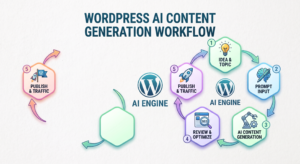
A typical workflow looks like this:
WordPress Dashboard → Enter Topic → Generate Content → Edit → Optimize → Publish
Depending on the plugin, you may also be able to generate:
- Featured images
- Excerpts
- Meta descriptions
- Product descriptions
- Headlines
- FAQs
- Social media content
- SEO suggestions
This can make content production much more efficient.
Are Free AI Content Plugins Really Free?
This is an important question before installing any AI plugin.
A plugin can be free to download from WordPress.org while the actual AI generation still requires:
- An OpenAI API key
- Another AI provider’s API key
- Free monthly credits
- A limited free plan
- A separate SaaS account
For example, AI Engine is available as a WordPress plugin and supports providers including OpenAI, Anthropic, Google, xAI, Mistral, Perplexity, OpenRouter and others, but you need to connect an AI provider to generate content.
Similarly, WPWriter’s WordPress connector has a free tier with limited posts and images and uses a bring-your-own-key model for OpenAI, Claude or Gemini.
Therefore, always check both the plugin price and the AI generation cost before building your entire content workflow around a plugin.
1. AI Engine
AI Engine is one of the most established AI plugins in the WordPress ecosystem and is particularly useful for users who want more than a simple article generator.
The plugin currently has more than 90,000 active installations on WordPress.org and provides AI tools directly inside WordPress. Its current feature set includes content generation, chatbots, image generation, AI forms, multiple AI providers, and an AI workspace.
Content Generation Features
AI Engine includes a Content Generator that can create a complete post from a topic. Its current WordPress.org listing describes a workflow where sections are generated first and then the article and excerpt can be edited before publishing.
This is useful if you want more control over the article rather than simply generating a large block of text.
You can also configure different AI providers and models.
The plugin supports connections to providers such as:
- OpenAI
- Anthropic
- xAI
- Mistral
- Perplexity
- OpenRouter
It also supports OpenAI-compatible custom connections.
Who Should Use AI Engine?
AI Engine can be useful for:
- Bloggers
- Developers
- WordPress agencies
- Content teams
- WooCommerce websites
- Advanced WordPress users
It is particularly interesting if you want to eventually build custom AI workflows instead of using the plugin only as a basic writing assistant.
2. GetGenie AI
GetGenie takes a more SEO-focused approach to AI content generation.
The plugin currently has more than 80,000 active installations and combines AI writing with keyword research, SERP analysis, SEO analysis, AEO and GEO-related features.
AI Writing Inside WordPress
After installing GetGenie, you can access its writing tools from the WordPress environment.
The plugin includes numerous AI writing templates and supports long-form content generation, headlines, introductions, outlines, meta descriptions and other content formats.
One useful feature is that the plugin combines content generation with SEO-related analysis instead of treating writing and optimization as completely separate processes.
SEO Research
GetGenie can analyze keywords and competitors and provide content-related SEO information.
That makes it useful when your goal isn’t simply to produce more articles but to build articles around a specific search topic.
If you are already using Rank Math, you can also combine your existing SEO workflow with AI-generated content rather than replacing your SEO plugin completely.
For a related tutorial, see:
How to Setup Rank Math SEO Plugin Correctly for Higher Rankings
Who Should Use GetGenie?
GetGenie is worth considering if your main goal is:
- SEO content creation
- Keyword research
- Competitor analysis
- Long-form articles
- AI-assisted WordPress writing
- Content optimization
3. AI Puffer
AI Puffer, formerly known as AI Power, is another broad AI toolkit designed to work directly inside WordPress.
Its WordPress.org listing describes features including AI content generation, chatbots, image generation, AI forms, automation, WooCommerce tools and AI knowledge bases.
Multiple AI Providers
One of the useful characteristics of AI Puffer is its provider flexibility.
The plugin supports providers including:
- OpenAI
- Google Gemini
- Microsoft Azure
- OpenRouter
- DeepSeek
- xAI
- Ollama
It uses a bring-your-own-API-key approach, meaning your AI usage is connected to your provider account rather than being hidden inside a single plugin subscription.
Content and Image Generation
AI Puffer can be used for content generation as well as images.
This can be useful if you want a single WordPress dashboard for several AI-related tasks instead of installing separate plugins for writing, images, forms and automation.
Who Should Use AI Puffer?
Consider it if you want:
- AI writing
- Image generation
- Multiple AI providers
- WooCommerce AI tools
- Chatbots
- AI automation
- Knowledge-base functionality
Because it includes many features, the dashboard may be more extensive than a simple AI writing plugin.
4. AI Bud
AI Bud is another WordPress AI plugin that includes a free content-generation feature.
Its WordPress.org listing describes AI content generation, chatbots, image generation, translation, proofreading and WooCommerce-related AI tools. The plugin currently has more than 2,000 active installations.
AI Content Generator
The free feature includes an AI Content Builder that can generate content from defined sections and paragraphs, including bulk generation workflows.
This can be useful when you want to quickly turn a topic into a structured draft.
The plugin also supports several AI ecosystems, including OpenAI, Google Gemini, Claude and OpenRouter.
Additional Features
AI Bud can also be used for:
- Blog content
- Product descriptions
- Images
- Translation
- Text improvement
- Chatbots
- SEO-related content
- WooCommerce content
The free content-generation feature makes it an option for users who want to experiment with AI-assisted writing before committing to a larger workflow.
5. WPWriter
WPWriter takes a slightly different approach.
Instead of simply putting an AI writing box inside the WordPress editor, its WordPress connector connects your site to the WPWriter platform.
The plugin currently has more than 2,000 active installations. Its free tier includes 15 AI-generated posts and 20 AI-generated images for one WordPress site.
AI Content Workflow
WPWriter provides tools for:
- AI article generation
- Images
- Auto-blogging
- Scheduling
- SEO metadata
- Content design
- Analytics
Its documentation also states that it can automatically generate SEO titles, descriptions and supported focus keywords for plugins including Rank Math, Yoast SEO and All in One SEO.
Auto-Blogging
One particularly interesting feature is scheduled content generation.
You can create a topic queue and configure how generated posts should behave.
For example:
Topic Queue → AI Generation → SEO Processing → Draft/Publish
The free tier is limited, so high-volume publishers may eventually need a paid plan or their own AI provider costs.
Who Should Use WPWriter?
It may be useful for bloggers who want:
- AI articles
- AI images
- Scheduled publishing
- SEO metadata
- Auto-blogging
- A centralized content workflow
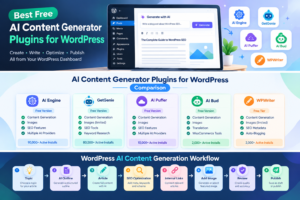
AI Content Generator Plugins Comparison
| Plugin | Free Version/Tier | Content Generation | Images | SEO Features | Multiple AI Providers |
|---|---|---|---|---|---|
| AI Engine | Yes | Yes | Yes | Yes | Yes |
| GetGenie | Free version | Yes | Limited/plan dependent | Strong | Yes |
| AI Puffer | Yes | Yes | Yes | Yes | Yes |
| AI Bud | Yes | Yes | Yes | Yes | Yes |
| WPWriter | Free tier | Yes | Yes | Yes | Yes |
The exact limits of free plans can change, so check the current plugin documentation before relying on a specific quota. Current WordPress.org listings confirm the main capabilities and installation information for these plugins.
How to Choose an AI Content Plugin for WordPress
Instead of choosing a plugin based only on the number of AI features, think about how you actually create content.
If You Want a Powerful WordPress AI Toolkit
AI Engine provides a broad set of AI features and multiple provider connections.
It is especially useful if you are comfortable configuring AI providers and want to experiment with advanced WordPress AI workflows.
If SEO Is Your Main Priority
GetGenie focuses heavily on SEO research, keyword analysis, content generation and optimization.
This makes its workflow particularly relevant to bloggers who want research and writing features together.
If You Want Multiple AI Tools in One Plugin
AI Puffer combines content, images, chatbots, forms, automation and knowledge-base functionality in one WordPress plugin.
If You Want a Simple Free AI Writing Option
AI Bud provides a free AI content-generation feature alongside its other AI tools.
If You Want Scheduled AI Publishing
WPWriter includes auto-blogging controls and scheduling through its connected platform. Its free tier also includes a limited number of AI posts and images.
How to Install an AI Content Generator Plugin
Installing most WordPress AI plugins is straightforward.
Go to:
WordPress Dashboard → Plugins → Add New
Search for the plugin name.
For example:
AI Engine
Then click:
Install Now → Activate
Some plugins require an API key or account connection after activation.
AI Engine’s current installation instructions specifically require activating the plugin and then connecting an API key from OpenAI or another supported provider.
Step-by-Step: Generate Your First AI Article
After installation, the exact interface depends on the plugin, but the basic process is similar.
Step 1: Choose a Topic
Start with a clear topic.
For example:
How to Speed Up a WordPress Website
Step 2: Define the Search Intent
Tell the AI what the reader wants to accomplish.
Example:
Explain how beginners can improve WordPress loading speed without changing their hosting provider.
Step 3: Generate an Outline
Ask the plugin to create sections before generating the complete article.
A useful outline might include:
- Introduction
- Common causes of slow WordPress websites
- Image optimization
- Caching
- Plugin optimization
- Database cleanup
- CDN
- Mobile optimization
- FAQs
Step 4: Generate the Article
Generate the first draft.
Do not publish it immediately.
Read through the article and check whether the information actually solves the reader’s problem.
Step 5: Optimize the Article
Add:
- Internal links
- External sources
- Images
- Screenshots
- Examples
- Relevant keywords
- Meta description
- Proper headings
For image-related optimization, you can also connect this workflow with your guide:
How to Optimize WordPress Images for Faster Loading Speed
Step 6: Publish
Once the content has been reviewed and formatted correctly, publish it.
How to Use AI Without Creating Thin Content
AI makes it easy to produce a large number of articles.
That does not mean every generated article deserves to be published.
Google’s current spam policies specifically describe scaled content abuse as generating many pages primarily to manipulate search rankings rather than helping users. Google also states that using generative AI to create many pages without adding value can fall under this policy.
Therefore, the goal should not be:
Generate 100 AI articles as quickly as possible.
A better workflow is:
Research → AI Draft → Human Editing → Original Examples → Internal Links → Fact Check → SEO → Publish
Your own experience can make an AI-assisted article much more useful.
For example, instead of asking AI to explain WordPress image optimization generally, add screenshots from your own WordPress dashboard and explain the settings you actually use.
Add Internal Links to AI-Generated Articles
One common mistake with AI-generated WordPress content is publishing articles without internal links.
For your WPWithARB website, relevant articles can be connected naturally.
For example, when discussing AI API integration, link to:
How to Integrate ChatGPT API into WordPress Website for Free
When discussing SEO optimization, link to:
How to Setup Rank Math SEO Plugin Correctly for Higher Rankings
When discussing content optimization, link to:
7 Best Content Optimization Plugins for WordPress
When discussing website backups before installing plugins, link to:
How to Backup Your WordPress Site Automatically for Free
When discussing website performance, link to:
Best Free WordPress Cache Plugins for Mobile Performance
These should be placed naturally inside relevant paragraphs rather than grouped together simply for SEO.
Useful External Links
For readers who want to verify plugin information or learn more about WordPress AI tools, use authoritative sources.
WordPress Plugin Directory
Google Search Spam Policies
When discussing responsible AI content publishing, link to Google’s official documentation:
Google’s current documentation specifically explains that AI-generated content is not automatically the issue; the concern is content produced at scale without meaningful value to users.
AI Engine
AI Engine Documentation on WordPress.org
GetGenie
AI Puffer
AI Content Generation Best Practices
To get better results from any AI writing plugin, follow a consistent workflow.
Give the AI a Detailed Prompt
Instead of:
Write an article about WordPress SEO.
Use:
Write a beginner-friendly WordPress SEO tutorial explaining how to optimize titles, meta descriptions, headings, internal links and images. Include practical WordPress examples and an FAQ section.
More specific instructions generally produce more useful drafts.
Use Your Own Examples
AI can explain general concepts, but your own screenshots and real-world experience can make the article more useful.
Fact-Check Technical Information
This is especially important for WordPress tutorials.
Check:
- Plugin settings
- WordPress menu names
- PHP code
- API instructions
- Compatibility information
- Pricing
- Plugin features
Avoid Repetitive AI Writing
If every paragraph begins with:
In today’s digital world…
the article will quickly feel generic.
Edit unnecessary introductions and get directly to the solution.
Don’t Force Keywords
Your focus keyword should appear naturally.
You do not need to repeat AI Content Generator Plugins for WordPress in every paragraph.
Cover related concepts such as:
- AI writing tools
- WordPress content generation
- AI blog writer
- AI writing assistant
- automated content
- WordPress AI plugins
- content optimization
This creates a more natural article.
Can AI Plugins Automatically Publish Posts?
Some AI plugins support scheduled publishing or automation, while others are primarily designed for creating drafts.
WPWriter, for example, documents topic queues and auto-blogging controls, including the ability to schedule generated posts and choose between drafts or publishing based on configured settings.
For a new website, however, a draft-first workflow is usually easier to control:
AI → Draft → Review → SEO → Publish
This gives you an opportunity to remove errors and add original information before the article becomes public.
AI Content Generator Plugins and Rank Math
AI-generated content still needs normal on-page SEO.
After generating an article, check your Rank Math settings for:
- Focus keyword
- SEO title
- Meta description
- URL
- Content readability
- Internal links
- External links
- Image ALT text
- Heading structure
- Schema
- Search intent
An AI plugin should support your SEO process rather than replace it.
If you are setting up Rank Math for the first time, see:
How to Setup Rank Math SEO Plugin Correctly for Higher Rankings
Frequently Asked Questions
What are AI Content Generator Plugins for WordPress?
They are WordPress plugins that connect AI writing and content-generation tools with the WordPress dashboard or editor. They can help create articles, outlines, titles, descriptions and other types of content.
Are AI content generator plugins free?
Many have free versions or free tiers, but AI generation itself may require an API key, credits or a paid service. Always check the current limits before choosing a plugin.
Which AI plugins work inside the WordPress dashboard?
AI Engine, GetGenie, AI Puffer and AI Bud all provide AI functionality within the WordPress environment. WPWriter connects WordPress to its separate content platform.
Can AI plugins generate complete blog posts?
Yes. Several plugins can generate complete articles from a topic or prompt. AI Engine, for example, currently describes a Content Generator that can create a complete post from a topic.
Can AI plugins generate images?
Some can. AI Engine, AI Puffer and AI Bud include image-generation functionality, while WPWriter’s free tier includes a limited number of AI-generated images.
Can AI-generated articles rank on Google?
AI assistance itself does not determine whether a page is useful or eligible for search. Google’s current spam documentation focuses on whether large-scale generated content is being created primarily to manipulate rankings and whether it provides value to users.
Should I automatically publish AI articles?
For most new workflows, it is better to generate drafts first. Review the article, verify important claims, add original information and then publish.
Can AI content plugins work with Rank Math?
Some AI content platforms can work alongside Rank Math, and WPWriter specifically documents support for generating and setting supported Rank Math SEO metadata.
Final Thoughts
AI content generation has become much easier for WordPress users because many plugins now bring writing tools directly into the WordPress dashboard.
The five options covered in this guide offer different approaches.
AI Engine provides a broad AI toolkit with multiple provider connections and WordPress-focused AI features. GetGenie combines AI writing with SEO research and optimization. AI Puffer offers a large collection of AI tools in one plugin. AI Bud provides a free content-generation feature along with other AI capabilities. WPWriter focuses more heavily on a connected content-production and scheduled publishing workflow.

