

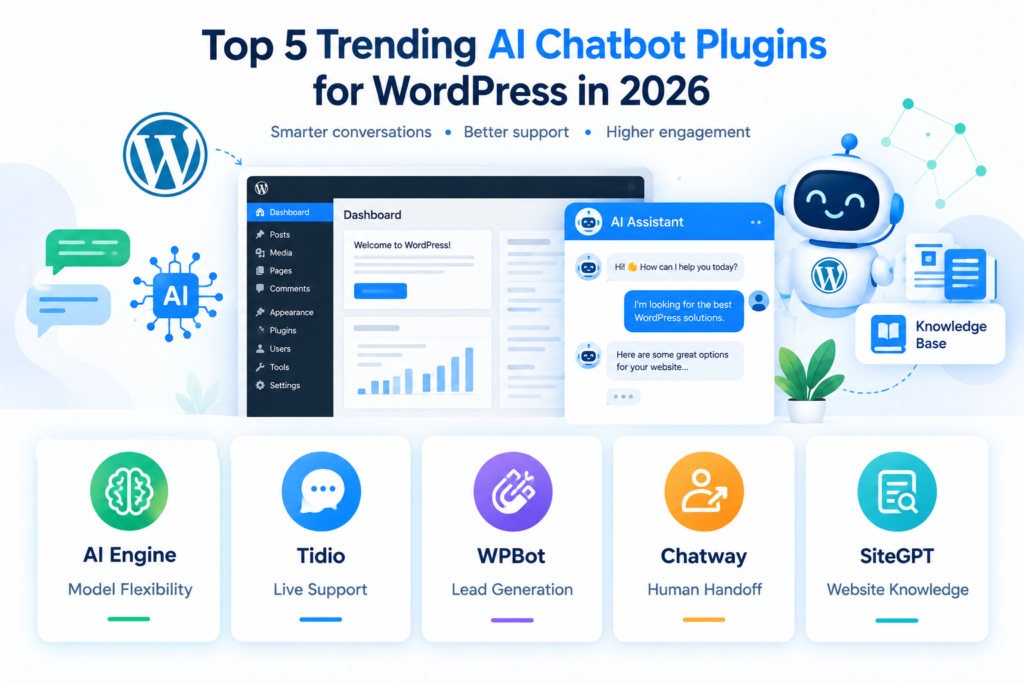
Adding an AI chatbot to a WordPress website can change how visitors find information, ask questions, contact support, and interact with your business. Instead of requiring visitors to search through multiple pages, an AI assistant can provide conversational answers directly from a chat interface.
In 2026, the WordPress chatbot market includes several different approaches. Some plugins connect WordPress directly to AI providers such as OpenAI, Anthropic, or Google. Others provide a hosted AI service that learns from your website content, while some combine AI support with live chat, lead generation, and WooCommerce features.
This guide looks at five currently active AI chatbot plugin options for WordPress and explains how they differ, what they can do, and what type of website each may fit.
Important: This is a feature-based comparison, not a ranking. Features, pricing, active installations, and AI capabilities can change, so check the official plugin page before installing.
Why AI Chatbots Are Becoming Popular in WordPress
Traditional WordPress chatbots often depended on predefined questions and answers. Modern AI chatbots can work with natural-language questions and, depending on the product, use website content, knowledge bases, WooCommerce information, or connected services to generate responses.
A chatbot can potentially help with:
- Frequently asked questions
- Customer support
- Product questions
- Lead generation
- Documentation searches
- Website navigation
- WooCommerce assistance
- Content recommendations
- Appointment or inquiry forms
- Human-agent handoff
The important difference is that not every AI chatbot works the same way.
One plugin might require you to connect your own API key. Another may provide a hosted AI agent. Another may focus primarily on live chat and support rather than WordPress-native AI functionality.
That is why comparing the underlying architecture is more useful than simply looking at the word “AI.”


What to Look for in AI Chatbot Plugins for WordPress
Before installing any chatbot plugin, look at the features that directly affect your website.
AI model support
Some WordPress AI tools let you choose between multiple AI providers. AI Engine, for example, supports connectors for OpenAI, Anthropic, Google, Mistral, Perplexity, OpenRouter, and other providers.
Other chatbot platforms use their own managed AI system.
If you already have an OpenAI API key and want control over your model, a BYOK-style plugin can be useful. If you prefer a managed service, a hosted chatbot may require less technical configuration.
Website knowledge
A chatbot should ideally understand your own website rather than simply provide generic AI answers.
Look for features such as:
- Website crawling
- Knowledge bases
- Embeddings
- RAG
- PDF or document sources
- Page and post context
- WooCommerce data
SiteGPT, for example, creates a chatbot trained on website content, while AI Engine provides embeddings and knowledge-base functionality.
Human handoff
AI should not necessarily handle every conversation.
For customer support websites, a human handoff can be important when the visitor needs a person to solve a complicated issue. Tidio and Chatway both combine AI capabilities with human live-chat workflows.
Cost control
AI requests can create API or subscription costs.
If you use a plugin that connects directly to an AI provider, check whether you are responsible for your own API usage. AI Engine explicitly uses your own provider credentials, meaning AI-provider costs are separate from the WordPress plugin itself.
Performance and privacy
A chatbot normally loads JavaScript or makes external requests. Check:
- Where visitor messages are processed
- Which third-party services receive chat data
- Whether scripts load asynchronously
- Whether the plugin conflicts with caching
- Whether you can limit chatbot usage
For example, SiteGPT’s WordPress plugin connects to its external service and sends visitor chat/session information to that service when the chatbot is used.
1. AI Engine
Best suited for: WordPress users who want extensive control over AI models and WordPress-native AI functionality.
AI Engine is one of the more feature-rich AI options available inside WordPress. The plugin can create chatbots, AI forms, content-generation tools, embeddings, and other AI-powered functionality.
The current WordPress plugin listing shows 90,000+ active installations, while the developer’s website reports more than 100,000 active installs across its ecosystem. The plugin supports multiple AI providers rather than forcing users into a single model provider.
Key features
AI Engine includes features such as:
- Custom AI chatbots
- Multiple AI providers
- AI forms
- Content generation
- Embeddings
- Vector databases
- Content-aware responses
- Function calling
- WooCommerce integrations
- Usage statistics
- Usage limits
- MCP functionality
- Realtime audio capabilities
The plugin can use your WordPress content as context and can connect AI functionality with WordPress features.
Another useful feature is provider flexibility. Instead of limiting the site to one AI provider, AI Engine supports OpenAI, Anthropic, Google, Mistral, Perplexity, OpenRouter, and other compatible systems.
What to consider
AI Engine provides a lot of flexibility, but that flexibility also means more configuration.
You may need to understand:
- API keys
- AI providers
- Model selection
- Token usage
- Embeddings
- Usage limits
It can therefore be more appropriate for technically comfortable WordPress users than someone looking for a completely managed chatbot service.
Useful internal link
If you are planning to connect OpenAI directly to WordPress, you can also read:
How to Integrate ChatGPT API into WordPress Website for Free
That article explains how to create an API-based WordPress AI integration using custom PHP.
2. Tidio – Live Chat & AI Chatbots
Best suited for: Customer support, sales conversations, live chat, and WooCommerce websites.
Tidio takes a different approach from a developer-focused AI framework. It combines live chat, automation, customer support, and AI chatbot functionality in one platform.
Its WordPress plugin provides a live chat widget, AI chatbot capabilities through Lyro, lead-generation tools, proactive messaging, and WooCommerce integration.
Key features
Tidio’s WordPress integration includes:
- AI customer support
- Live chat
- Chatbot templates
- Visual chatbot builder
- Visitor tracking
- WooCommerce integration
- Product cards
- Cart and order information
- Lead generation
- Agent routing
- Proactive messages
Tidio currently states that Lyro can automate up to 70% of customer questions, although actual results will depend on the website, knowledge base, questions, and configuration.
WooCommerce integration
For an online store, the WooCommerce integration can be particularly relevant because chat can incorporate shopping-related information.
Visitors can interact with support while the system can work with information such as products, carts, and orders.
This makes Tidio different from a simple AI text-generation plugin.
What to consider
Tidio is primarily a hosted customer-support platform rather than simply a WordPress AI framework.
That means you should compare:
- AI usage limits
- Subscription plans
- Available automation
- Number of agents
- Integration requirements
- Data processing
before choosing a plan.
3. WPBot
Best suited for: Lead generation, conversational forms, FAQs, support, and flexible AI chatbot workflows.
WPBot is a native WordPress chatbot plugin designed around customer support, lead generation, automation, and AI services.
Its current WordPress listing describes both traditional chatbot functionality and integrations with modern AI providers. It can work with OpenRouter and connect to providers including OpenAI, Anthropic, Google, Mistral, xAI, DeepSeek, and others.
Key features
WPBot provides:
- AI chatbot functionality
- FAQ support
- Conversational forms
- Lead generation
- Multiple AI providers
- OpenRouter integration
- Google Gemini integration
- RAG
- Vector database embeddings
- WooCommerce-related functionality
- Automation
- Multilingual support
- RTL support
The plugin can also be used without an external AI service for more traditional chatbot functionality.
Lead-generation use cases
One interesting use case is conversational lead collection.
Instead of presenting a long traditional form, a chatbot can ask visitors questions step by step.
For example:
Visitor: I need a website redesign.
Bot: What type of website do you have?
Visitor: WooCommerce store.
Bot: Approximately how many products do you sell?
This type of interaction can be useful for agencies, service businesses, real-estate websites, and other lead-generation websites.
What to consider
WPBot has many options, so configuration can become more involved as you enable additional AI services, integrations, and automation.
If your goal is simply a small FAQ chatbot, you may not need all of its advanced functionality.
4. Chatway Live Chat
Best suited for: AI customer support combined with human live-chat support.
Chatway combines an AI support agent with live chat and helpdesk functionality.
Its WordPress plugin currently has 30,000+ active installations and provides AI chatbot functionality that can use website content and connected WordPress/WooCommerce information.
Key features
Chatway includes:
- AI chatbot
- Live chat
- Helpdesk
- FAQ functionality
- Human-agent handoff
- Website-content training
- WordPress data
- WooCommerce data
- Visitor monitoring
- WhatsApp integration
- Instagram integration
- Facebook Messenger
- Email and other chat channels
- Mobile applications
The AI chatbot can work with WordPress and WooCommerce information such as pages, posts, products, orders, and cart information.
Human support
A major part of Chatway’s approach is keeping humans involved.
The AI can handle common questions while support agents monitor conversations and take over when necessary.
This can be useful when you don’t want an AI system to handle every customer interaction independently.
Free plan
The WordPress listing states that Chatway has a free plan for basic live-chat functionality, while paid plans unlock additional capabilities such as automation, integrations, multi-seat access, and extended chat history.
As always, check the current pricing before making a purchasing decision.
5. SiteGPT
SiteGPT official WordPress plugin
Best suited for: Website owners who want a chatbot trained on their website content with minimal WordPress configuration.
SiteGPT uses a hosted approach. Instead of running the complete AI system inside WordPress, the WordPress plugin connects your website to a SiteGPT chatbot.
The official SiteGPT WordPress page describes a lightweight plugin with a simple chatbot-ID configuration.
Key features
SiteGPT provides:
- Website-content training
- AI chatbot
- Simple WordPress installation
- One-field configuration
- Automatic script injection
- Theme compatibility
- Mobile-responsive chatbot
- Customizable appearance
- Lead generation
- Analytics
The service can train a chatbot using your website content and embed it into WordPress without requiring custom PHP code.
Why the hosted approach matters
A hosted chatbot can be easier to configure because you don’t necessarily need to manage API keys, model configuration, embeddings, or AI infrastructure yourself.
However, there is a trade-off.
Your chatbot depends on an external service, so you should review:
- Privacy policy
- Data processing
- Service availability
- Pricing
- Usage limits
- External JavaScript
- Vendor lock-in
The WordPress plugin documentation specifically states that visitor messages and related session information can be sent to SiteGPT’s servers to generate responses.
AI Chatbot Plugins for WordPress Comparison
| Plugin | Main approach | AI/model flexibility | Knowledge/content | Live human support | WooCommerce |
|---|---|---|---|---|---|
| AI Engine | WordPress-native AI framework | High | Yes | Limited/native configuration | Yes |
| Tidio | Hosted support platform | Managed AI | Yes | Yes | Yes |
| WPBot | Native WordPress chatbot | High | RAG/vector options | Available through integrations/features | Yes |
| Chatway | AI + live chat/helpdesk | Managed AI | Yes | Yes | Yes |
| SiteGPT | Hosted website-trained chatbot | Managed | Website content | Depends on setup | Website-focused |
The table reflects documented product capabilities; individual features can depend on the plugin version or paid plan.
Which Type of AI Chatbot Should You Use?
Instead of asking which plugin is universally “best,” start with your website’s actual requirement.
For a technical WordPress website
A WordPress-native AI framework such as AI Engine can provide extensive control over AI providers, prompts, embeddings, forms, and integrations.
For customer support
A platform such as Tidio or Chatway combines AI with human support workflows, making it possible to transfer conversations to support agents.
For lead generation
WPBot provides conversational forms and AI actions that can be used for lead qualification and other structured interactions.
For a simple website-trained chatbot
SiteGPT focuses on training a hosted chatbot using website content and embedding it into WordPress through a lightweight plugin.
How to Install an AI Chatbot Plugin in WordPress
The exact setup depends on the plugin, but the general process is similar.
Step 1: Create a backup
Before installing a new plugin, create a recent backup of your WordPress website.
If you need a free backup strategy, see:
How to Backup Your WordPress Site Automatically for Free
Step 2: Open WordPress Plugins
Log in to your WordPress dashboard and go to:
Plugins → Add New Plugin
Search for the chatbot plugin you want to test.
Step 3: Install and activate it
Click Install Now and then Activate.
Some hosted chatbot platforms will also ask you to create an external account.
Step 4: Connect the AI service
Depending on the plugin, you may need to:
- Add an API key
- Select an AI provider
- Connect an account
- Enter a chatbot ID
- Train the chatbot
- Import website content
For example, AI Engine requires an API key from your selected AI provider, while SiteGPT uses a chatbot ID from its external dashboard.
Step 5: Configure the chatbot
Set:
- Chatbot name
- Welcome message
- Appearance
- Response behavior
- Knowledge sources
- Language
- Usage limits
- Human handoff
Step 6: Test before publishing
Ask the chatbot real questions from your website.
For example:
What services do you provide?
What is your refund policy?
How can I contact support?
Which hosting plan should I choose?
Check whether the answers are actually based on your website information.
How to Prevent AI Chatbot Hallucinations
One of the biggest problems with AI chatbots is that they can sometimes generate information that isn’t supported by your actual business data.
To reduce this problem:
Give the chatbot accurate information
Your FAQ pages, documentation, product descriptions, and policies should be updated.
Use your own content as context
Features such as RAG, embeddings, knowledge bases, or website training can help the AI retrieve information from your own content. AI Engine, WPBot, and SiteGPT all document content-aware or knowledge-based approaches.
Add clear instructions
Tell your chatbot something like:
If the answer cannot be found in the available website information, tell the visitor that you do not have enough information instead of inventing an answer.
Provide human escalation
For complicated customer-service questions, provide a way to contact a real person.
AI Chatbot Performance and WordPress Speed
Adding a chatbot does not automatically mean your website will become slow, but third-party scripts and additional requests can affect performance.
This is especially important for websites that already have:
- Large images
- Too many plugins
- Heavy page builders
- Poor hosting
- Unoptimized JavaScript
- Multiple tracking scripts
Before publishing your chatbot to every page, test your website using performance tools and monitor Core Web Vitals.
You can also read our related guide:
How to Optimize WordPress Images for Faster Loading Speed
And if caching is another issue, see:
Best Free WordPress Cache Plugins for Mobile Performance
Security Considerations
AI chatbot plugins can process visitor messages, customer information, and potentially sensitive business data.
Before activating a chatbot, check its privacy documentation and data-processing practices.
Never expose an AI provider’s secret API key directly inside frontend JavaScript.
For a custom OpenAI integration, the safer architecture is:
Visitor → WordPress Server → AI API → WordPress Server → Visitor
rather than putting your secret API key directly into browser-side code.
For more information, see our detailed guide:
How to Integrate ChatGPT API into WordPress Website for Free
You can also review the official WordPress developer documentation for making external HTTP requests with wp_remote_post().
Common Mistakes to Avoid
Installing multiple chatbot plugins
You usually don’t need several chatbot widgets running simultaneously.
Multiple chat widgets can confuse visitors and add unnecessary scripts.
Ignoring API costs
A plugin may be free while the AI service behind it is usage-based.
Always distinguish between:
Plugin cost + AI provider cost + optional service subscription
Letting the chatbot answer everything
AI should not automatically answer questions involving sensitive account information, refunds, legal issues, medical matters, or other high-risk topics without appropriate controls.
Not updating your knowledge base
An AI chatbot trained on outdated information can give outdated answers.
Keep your:
- Pricing
- FAQs
- Documentation
- Product information
- Contact information
- Policies
up to date.
Forgetting mobile users
Test the chatbot on smartphones and tablets.
Make sure the chat window doesn’t cover important buttons or make the page difficult to navigate.
FAQs
What are AI chatbot plugins for WordPress?
AI chatbot plugins add conversational AI functionality to WordPress websites. Depending on the plugin, they can answer questions, use website content, generate leads, provide customer support, or connect visitors with human agents.
Are AI chatbot plugins free?
Some offer free WordPress plugins or free plans, but AI functionality may have separate API, usage, or subscription costs. For example, AI Engine uses your own AI-provider credentials, while Chatway offers a free plan with paid upgrades.
Can an AI chatbot learn my WordPress website?
Yes. Several modern tools provide website-content training, RAG, embeddings, or knowledge-base functionality. The exact implementation varies by plugin.
Can I use ChatGPT with WordPress?
Yes. You can connect WordPress to OpenAI through an AI plugin or build your own integration using the OpenAI API.
Do AI chatbots work with WooCommerce?
Several chatbot tools provide WooCommerce functionality. Tidio and Chatway document integrations involving products, carts, orders, or other WooCommerce data, while AI Engine and WPBot also provide WooCommerce-related AI functionality.
Will an AI chatbot slow down WordPress?
It can, depending on how the plugin loads its scripts and communicates with external services. Test your website after installation, especially on mobile devices.
Can I connect a chatbot to my own OpenAI API key?
Yes. AI Engine is one example of a WordPress AI plugin that allows users to provide their own AI-provider API key.
Internal Links to Add
Use these naturally inside the article:
- Content AI 2.0: Introducing AI SEO Inside WordPress
- 7 Best Content Optimization Plugins for WordPress
- How to Setup Rank Math SEO Plugin Correctly for Higher Rankings
- How to Optimize WordPress Images for Faster Loading Speed
- Best Free WordPress Cache Plugins for Mobile Performance
- How to Integrate ChatGPT API into WordPress Website for Free
- How to Backup Your WordPress Site Automatically for Free
- How to Deactivate WordPress Plugins When Locked Out of Admin Dashboard
External Links to Add
For credibility, use official sources:
- AI Engine official website
- AI Engine on WordPress.org
- Tidio WordPress plugin
- WPBot on WordPress.org
- Chatway on WordPress.org
- SiteGPT WordPress plugin
- WordPress Chatbot Plugins Directory
Final Thoughts
AI chatbot plugins are becoming more capable in 2026, but they are not all built for the same purpose.
Some focus on WordPress-native AI and model flexibility, some combine AI chatbot plugin with live customer support, some emphasize lead generation and conversational forms, and others provide a hosted chatbot trained on website content.
Before installing one, define what you actually want the chatbot to do. Then compare its AI model options, knowledge-base capabilities, human handoff, WooCommerce support, privacy practices, performance impact, and total cost.
The right setup is ultimately the one whose architecture and features match your website’s actual requirements.

